- American students are avoiding IT degrees - This year's statistics show that the number of students registering for engineering and IT-related degrees is in decline - despite the fact that salaries in those fields are at all-time high. In addition, the number of women registering for those degrees is in an even sharper decline. Is this normal market behavior? Or does today's youth able to predict tomorrow's bubble burst?
And what does it all say about immigration into the US? Will people in the government finally recognize that they need to "open the gates" and accept more foreign knowledge workers to fulfill the massive need? Will they realize it in time, or after all the jobs have been outsourced to countries more eager to lead the world technologically?  Find interesting connections in your inbox - I've been using this cool add-on called Xobni (inbox in reverse) since the early beta began last December. If you're a Microsoft Outlook (2003 and up) user, this thing is priceless. It'll index your email (.pst files as well) and start finding patterns you haven't expected before: who do you correspond with the most? who replies promptly? What time of day do you usually get/respond to email from certain people?
It also allows you to see all "conversations" you had with a correspondent in a nice panel, showing all the other people involved (very useful for me: every time I get an email from one of my clients, I immediately get the names of all other contacts I have at that company). The latest release will also show you the LinkedIn profile of the name you highlight. Xobni was about to be purchased by Microsoft earlier this year, but elected to retain its independence, rather than disappear in the Redmond cellars). Get Xobni at xobni.com.
One last note: privacy is extremely important to me, and I made sure no information leaves my machine. You can turn off all the "support sharing" options, and stop the Xobni update service (that periodically pings Xobni for an updated version) to feel completely safe.
Other similar solutions I've tested in the past used to upload and store information on their server - Xobni keeps it all on your disk.- And in a related item... - And if you still think your information and mailbox are safe at the workplace, behind a nice firewall and all the corporate security crap IT forces you to install - think again. According to this survey, between 33% and 50% of IT administartors snoop on their users. We're talking about a potentially dangerous security hole here, both personally and business-wise, not to mention privacy concerns.
So, while IT enforces crazy security policies, it also listens into our calls, "for our own protection".
Many times it a lone IT administrator who thinks he's so much smarter than you, just because he has the root password. A lot of it is childish mentality.
And this is where I make my personal confession: I worked my way through my first degree as my faculty's Unix sys admin. I've seen some things and done some stuff I'm not proud of (this is worth a separate post - remind me if I don't get to it), but I have NEVER even thought of reading private email. That's where I drew the line between being "smart" and being "criminally childish".
Bottom line, as I've mentioned before - don't do anything personal at work. Don't leave "incriminating" traces behind. And think before sending every email, what would happen if more than just the recipient got a hold of it. - No more AP quotes - AP decided to start charging bloggers who quote from its news sources and web sites. They claim they'll start charging for sentences of "5 words or more". This, to me, sounds preposterous. Rather than thank bloggers who cite their quotes and create positive publicity for AP, they fine them and post DMCA takedown notices against their sites.
And "5 words or more"? What are you? Morons? Let's say I say "The man crossed the street". I'm sure you can find that phrase somewhere in the vast AP article collection. Do they now expect me to pay $12.50?!!
People, here's how we fight that: go through the AP site, and find 5 word sentences that appeared in your blogs first, and charge AP $12.50 for them. I'm sure they'll get the message soon. - Track your flight's price - Yapta is a new site that allows you to specify a trip, and follow price trends for it across time and airlines. You can set alerts to be sent to you whenever the price drops or rises to a certain point. And the coup-de-gras: if you've already purchased a ticket, and the price dropped further, Yapta will assist you in getting a refund from the airline. Cool!
- Non Kosher headset - This tasteless headset, supposed to resemble a pig stuck in your head, made me laugh for a while. Probably won't sell well in the middle east
 :
:

|
||
|
“Whenever I found out anything remarkable, I have thought it my duty to put down my discovery on paper, so that all ingenious people might be informed thereof.” - Antonie van Leeuwenhoek (inventor of the microscope) |
||
Saturday, June 28, 2008
Technological Digest XV
Long time since my last digest. My virtual drawer is full of items to discuss. But since this is a digest and I don't want any yawning readers, we'll limit the number. Here goes Digest XV:


Monday, June 23, 2008
Gadget Review - Pulse Smartpen
 A few weeks ago (5 to be exact) I've mentioned the Pulse Smartpen by Livescribe in a Gadget digest. I got so in love with the concept that I immediately ordered one. The wait period was 3-6 weeks, so I finally got mine last Friday (came back home and the box was thrown at my doorstep - insert big "no thanks FedEx" here
  ).
).I've been playing with the pen throughout the weekend - and I'm still in love. The concept of seeing and hearing what took place at a meeting/lecture/phone call (if it's on speaker) and in the order it occurred adds a new dimension to note taking.
Let's start with what the Smartpen does for you: it has a built in camera and 2 microphones (that can be enhanced by a 3D microphone/headset to capture spatial sound - provided with the pen). You write your notes on a special Dot Paper (a notebook with a 100 sheets provided) and talk, or listen while writing (think about a lecture, or a meeting with a client).
The pen captures all the sound AND synchronizes it with what you've written at the same time. The result is a "session", spanning one or more pages. This session can be played back, shared and even uploaded to an online space, using a desktop application. It is also stored in the pen (1/2GB, $149/199 available). The replay from the pen is ingenious - just touch a word you've written on the page, and the pen will play the sound you've heard while writing it.
Uploading the "pencast" to Livescribe's community site is easy and allows storing, sharing and even publishing your pencast. I recommend watching some of those pencasts (the "Star Wars" one is quite funny, a mom teaching her son to count in Chinese is also nice - and check out the college lectures).
While watching a pencast (and I recommend maximizing the screen for full effect) you can touch a word or a drawing with the little red dot and the sound would roll backwards or forwards to that location.
Here's a flash of me explaining how I write a post for the blog. If you want to see the actual pencast (and maybe rate it), go here. Excpect some more pencasts from me in the future - this seems like a great way to pass my thoughts to a page without going through a keyboard filter.
The pen comes pre-packaged with some applications: draw a piano keyboard, touch the keys and you're playing music (I considered uploading my music session, but decided I don't want to lose the last of my audience
). Draw a calculator, touch the keys and you'll get the results. Write a word in English, touch it and get it pronounced and written in Spanish, German or Chinese (currently limited to 20 words - but this is just a demo).The pen has high production values: it feels comfortable in my hand, the sound is clear, recording is easy (just touch a "record" icon at the bottom of the page, or draw one and touch it) and it lives up to my expectations. The support staff (had some issues registering the pen) is attentive, quick to reply and very nice to deal with.
Sadly the site and desktop software are less than stellar, with some errors and issues (the site, which looks like it's based on a Mac server platform, is not very stable and funny enough, looks better in IE). The desktop software is pretty simplistic, allowing for management of your sessions and nothing more (some editing tools would be appreciated).
To tell you the truth, after browsing through the (quite full) forums, I ended up at the jobs section, and nearly sent my resume for the Product Manager's position, just so I can add some cool features to the product
. Maybe someday - if they'll have me  .
.But the biggest feature that attracted me is the SDK, allowing development of pen applications. I'm awaiting it's official release and already have some cool ideas of what I can do with this platform. Also eagerly awaited is a promised template, allowing you to print Dot Paper pages on your own, rather than having to buy them from Livescribe.
Bottom line: this is just the beginning for this platform, with many new applications down the road. Even so, I feel I'll get great value from the pen in the near future. Recommended.
Update 6/24/08: Just fixed a typo: the Smartpen product name is Pulse not Pulsar. While I could easily fix the post, I can't fix my pencast (Livescribe: those editing tools I was asking for?). And thanks to Karen from Livescribe for correcting me
.
Disable UAC in Vista - Properly
One of the security measures MS added to Vista is the User Access Control (read Microsoft's take on UAC here). Essentially, every little change in your OS has to be approved by a user with an appropriate permission . This includes changes to files, registry keys, installations/uninstallations of software, but also resolution changes, background changes and various innocuous everyday changes.
To make a long story short, you get so many notifications from UAC, that 10% of your work in Vista consists of approving actions you yourself initiated. This thing has pissed off so many people, that the 'net is full of "how to turn off UAC" guides. Many people think, and rightfully so, that getting confirmation for every action is a very lazy and inefficient way to implement a "security measure". You can see a funny representation of this in this funny Apple commercial.
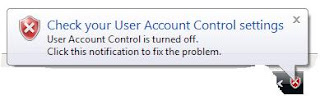 The main problem with outright disabling UAC is that you get a menacing Security Center alert in the form of a red icon in your taskbar, claiming that "your machine is not protected".
To get rid of UAC and this annoyance all together, follow these steps:
While researching this post, I came across this recommendation: don't turn off UAC, just tell Vista to automatically accept each action. While this sounds essentially the same - it still keeps UAC on and logs every action. Here are the steps from that article:
Notice that this tip works in Vista Ultimate only. To read more about this option and the story behind it, here's the link.
To make a long story short, you get so many notifications from UAC, that 10% of your work in Vista consists of approving actions you yourself initiated. This thing has pissed off so many people, that the 'net is full of "how to turn off UAC" guides. Many people think, and rightfully so, that getting confirmation for every action is a very lazy and inefficient way to implement a "security measure". You can see a funny representation of this in this funny Apple commercial.
 The main problem with outright disabling UAC is that you get a menacing Security Center alert in the form of a red icon in your taskbar, claiming that "your machine is not protected".
To get rid of UAC and this annoyance all together, follow these steps:
- Go to Start->Control Panels->Security Center and locate the User Access Control section in the bottom.
 Turn UAC off - this calls for a restart.
 - Before restarting look at the left side of the control panel and click "Change the way Security Center alerts me".
- In the next screen, you can click option 3 ("Don't notify me and don't display the icon"), so you'll never get that red icon again.


While researching this post, I came across this recommendation: don't turn off UAC, just tell Vista to automatically accept each action. While this sounds essentially the same - it still keeps UAC on and logs every action. Here are the steps from that article:
Click Start and Control Panel. Switch to Classic View (if you haven't already) and click on the Administration Tools icon. In the list that opens click on Local Security Policy, and in the next window, Local Policies (a tiny bit redundant, but all UIs can't be perfect -- If UAC is running you'll get a UAC pop-up somewhere in here). In the Local Policies list click Security Options, and scroll down to "User Account Control: Behavior" (the full title of the policy is "User Account Control: Behavior of the elevation prompt for administrators in Admin Approval Mode" but the window barely opens that far). Double-click the title and in the dialog box change its setting from "Prompt for Consent" to "Elevate without prompting." Click OK and the urge to tear your hair and scream at your PC will be greatly diminished in the future.
(One note of caution: This works for Vista Ultimate. I don't guarantee it will work in all versions, or in all time zones. Please add a comment below if you've got a version of Vista it doesn't work with.)
Notice that this tip works in Vista Ultimate only. To read more about this option and the story behind it, here's the link.
Sunday, June 22, 2008
2 Microsoft Tips
It just dawned on me it has been ages since I published a tech tip. The following 2 tips come from direct personal experience, both mine and colleagues'.
- The dreaded IE7 syndrome - whether Microsoft realizes it or not, not all web applications out there support IE7 - even though it has been out for 3 years or so.
That doesn't stop the nice boys (and girls) in Redmond from pushing IE7 as a crucial update on the automatic update service.
As it happens, some colleagues of mine (and even one customer I managed to assist) woke up one morning with IE7 installed. Other than the fact the UI shocked them a bit, several applications they had to use in their daily work stopped working (there are several, but the main one is Siebel CRM). I had at least 4 people ask me this question and the answer is simple:
1. Uninstall IE7 - this reverts your OS back to IE6 (provided it was there to begin with! Do not try in Vista or Windows 2008!). Don't forget to reboot.
2. Go to the Windows Update site and hide the IE7 update, so you won't get it again. Ignore the warnings - they were written by the marketing department.
And that's it - all is well with the world. Until IE8 gets forcefully planted on your machine. - The case of the misinstalled IM - I use MSN Messenger (now known as Live Messenger) as my IM client - in all three of my machines (XP, Vista, Mac OS).
About 3 weeks ago, i started observing a strange behavior (on the Windows based machines, my Mac is Ok): whenever I started the application, an installer window came up, started running something and failed with error 2771 (which I later found out is "resource missing"). It stopped the auto sign-in process, but I could still sign in manually and use the IM client well. It was annoying.
After some analysis and recording I found out it's a registry key missing. Further reading suggested many people started suffering from this symptom after installing SP3 on XP or SP1 on Vista (both of which I've installed). There were several resolution suggestions (in lieu of the fact Microsoft didn't publish an updat or a solution until now).
Some articles recommended deleting a registry key, involving the IM's policy, others suggested registering a dll that might have gotten unregistered during the SP's installation.
But the real solution, that worked for me twice now is: uninstall and reinstall the IM. Don't worry about your contacts etc. - these are kept as part of your Passport ID.
Subscribe to:
Posts (Atom)