“Whenever I found out anything remarkable, I have thought it my duty to put down my discovery on paper, so that all ingenious people might be informed thereof.” - Antonie van Leeuwenhoek (inventor of the microscope)
In my CES post, I told you about how excited I was to meet the Pressy guys, a Kickstarter project I backed.
Well, 6 months have passed, and my Pressy finally arrived - way behind schedule. And as it turns out, way over the price of its competitors. To the right is the 'Klick', one of Pressy's cmpetitors, sold for quarter of the price, arrives in a nicer box, and available 2 months before Pressy was released.
To read my full review and impressions of the Pressy, the Klick, the Kickstarter project and more, please jump to my Medium article.
Explanation:
I'm currently trying a new micro-blogging platform called Medium. It allows fast posting of short stories, including simple, frictionless, online editing. Since this is my main blog, I'll include a reference to any Medium story I post, and you can always see all my stories at my Medium profile page.
The moment you realize it’s impossible to forget childhood memories — a story for Holocaust Remembrance Day 2014
Gate of Dachau, after the American army liberated it (http://www.archives.gov/)
Holocaust Remembrance Day is observed as Israel’s day of commemoration for the approximately six million Jews who perished in the Holocaust as a result of the actions carried out by Nazi Germany and its accessories, and for the Jewish resistance in that period. This year it was observed on April 28th, and commemorated 70 years since the annihilation of Hungarian Jewery.
Memories
As a child, growing up in Israel in the ‘70s, I was very fortunate to have all four of my grandparents alive. Almost everyone I knew had lost a grandparent, uncle, relative in the holocaust. All four of my grandparents lost their entire families; and all had a blue number tattooed on their arms, to forever remind them of their loss.
My parents kept mentioning how lucky I should feel, as they never met their grandparents. I heard many stories as a kid — and not just from relatives. There were still many people alive who had personally survived the horrors in Europe. They saw it as their moral obligation to pass their stories on, lest anyone forget.
Speaking of Germany or Germans at home was usually accompanied by a swear word, or simulated spitting. I remember watching football (“soccer” in Americanese) world cups, and rooting for whoever Germany was playing against. This was not strictly an Israeli behavior: in Montreal, where my cousin and his family live, no Jew dares buying a BMW, Audi or Mercedes — even if they could afford it.
Flash forward to 2004. At that point in history, the attitude toward Germany has changed amongst the younger Israeli generation. People had German customers, and even friends. Some Israelis even migrated to Berlin, seeking education and job opportunities. I myself worked with some German colleagues, and found them to be nice, professional, and even possessing sense of humor (which they were rumored to lack). General hatred toward Germany was considered an older-generation affliction.
Of my four grandparents, only my dad’s mom is still with us. (In fact we celebrated her 92nd birthday this past March — may she live to be a 120.) My grandma was livid when she heard my parents and I went to visit Hungary. Her hatred of Germans is only surpassed by her hatred towards Hungarians, whom she considered worse than the Nazis. My visit to Budapest confirmed some of her opinions: to kiss up to the Nazis, the Hungarians voluntarily annihilated their Jewish population in less than a year — starting in 1944, when the war was nearly over.
I had been working as a professional services consultant at a small startup, in charge of European accounts. My week usually started at Ben Gurion airport on Sunday afternoon and ended there on Friday night, or Saturday morning, after a full week on site.
In December of that year, I was assigned a lucrative account: a major German company, based in Munich. I got in touch with our sales guys in Munich over phone and email. We agreed that the training I was supposed to deliver in English, would instead be delivered by one of them in German — to make it easy on the students. I would shadow the class, and assist with questions and exercises.
I told my dad where I was headed the next week. He was not thrilled, to say the least. He asked me to not tell grandma where I was going. He also reminded me that the next week was Hanukah — the Jewish holiday celebrated by lighting a menorah every evening. Sadly, I had forgotten his second point.
Munich
Leaving Israel’s always-summer weather, I landed in frozen Munich, just in time for Christmas season. Every place had Christmas trees and decorations; Christmas stores were everywhere. I met my colleague for breakfast and we took his car, a finely-tuned BMW, to the customer’s site. I was introduced to 8 developers and their manager, all of whom were extremely nice and welcoming. They were relieved to hear that they wouldn’t have to strain their English skills to become fully trained. I spent that day sitting at the back of the class, listening to my colleague deliver our slides in German. All conversation was in German. Whenever I jumped in, the pace of the class slowed, to allow for back-and-forth translations. It was a jarring experience.
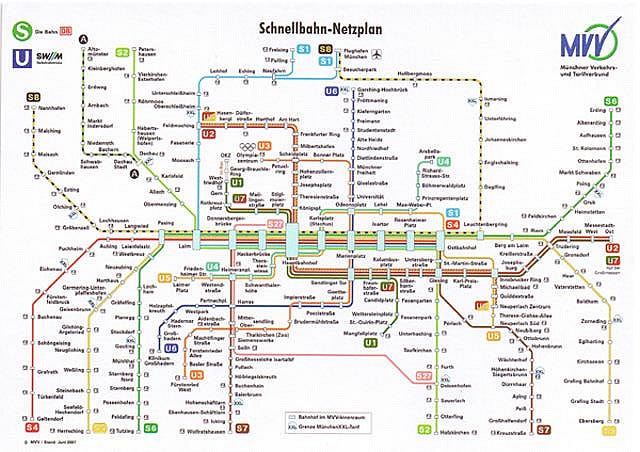
The next day, I was supposed to get to the customer site on my own. “No problem,” said my colleague, “Munich has one of the best underground networks in the world, and our client has a stop right next to the office.” That evening at my hotel, I downloaded a map and started to plan my commute:
Munich underground map
Scanning the list of train stops, my eyes were attracted like a magnet to a name I recognized immediately: Dachau. You couldn’t have grown up in ‘70s Israel and not have heard about Dachau, the first concentration camp. I never knew it was in Munich itself. I located the line I needed to take, and looked for the last stop, to know which direction I need. My eyes landed on the second Munich landmark I recognized: the Olympic Stadium. A place where 11 Israeli athletes were murdered in 1972. My destination was located between 2 places where Jews were killed for being Jews.
A terrorist at the 1972 Olympic Massacre
Memories started flooding in. I left the room and wandered the streets. My dad called: did I remember to light the Hanukah candles? I was ashamed I had forgotten. I started going from store to store, looking for candles. The only ones I could find were small, red, heart-shaped Christmas candles. I bought 5 (it was the 4th night, so 5 candles were needed), rushed back to my hotel room, and lit them on the windowsill. I remember hoping people on the street would look up, see the candles, and know that 60 years later, a grandson of holocaust survivors is back in their city, lighting Hanukah candles.
I Quit
Despite everyone around me being extremely nice and welcoming, the next day was torture. I cringed every time I heard German spoken; I eyed people on the subway suspiciously; I started feeling physically unwell. After work, I rushed back to my hotel room and called my boss. I told him in a few quick sentences how I felt, and told him I wasn’t sure I could continue doing this. I even offered to quit, if required.
I had one of the best bosses one could have (sadly, hindsight is 20-20 ☺). He had plenty of experience working in Germany, and he even speaks German. He calmed me down, explained it’s a common issue with first time visits to Germany by Israelis, and rejected my resignation. He said it’d get better. And he was right — it did.
Since that first time, I’ve visited Germany several more times. I met some very lovely people (and some that were not — but then, you have those everywhere). I helped close my biggest deal ever with a large German corporation. I worked long hours with German engineers. I heard plenty of German spoken next to me, and have not gone into culture shock again.
`Wearables` is still not a word in the Oxford dictionary (and consequentially, marked with a red dotted line every time I type it somewhere), but it would probably be added soon. The idea of equipping humans with sensors is age-old: remember the $6M Dollar man? With miniaturization, advances in technology, and price drops, I'm guessing Steve Austin would probably retail for $199 + tax if he were made today.
Tinke Blood Sensor for iPhone
People and machines generate huge amounts of data, even when at rest. One of the figures I heard this week is 15GB of data per hour generated by a modern car. For humans, many things can be measured: pulse, blood pressure, sweat, salinity, speed, location, altitude, steps - the list goes on and on, with new measurable data added every year. We are finally at a point where, on the one hand, sensors are cheap, and on the other, data analysis methodologies have advanced enough to find useful patterns in huge amounts of data (aka 'Big Data'). These are the main reasons why we're seeing a boom of sensors integrated into watches, wrist-bands, necklaces and clothes.
Smart watch
I don't know the percentage of booths that promoted wearables at CES this year, but it seemed like
there were a good number of them. I've had enough of smart watches on the first day: they all looked bulky, and none looked like it can be worn comfortably on a daily basis, or be worn by a woman.
I did like seeing sensors integrated into shirts, allowing you to improve your athletic regimen on one end of the spectrum, and predict an impending stroke or heart attack on the other. Imagine a day in the (not too distant) future, when your shirt will signal you to take a drink of water, or call a doctor immediately.
Printed chip
Just like last year, 3D printing had a big footprint at the show. It was less interesting to see the printers in action again (I've seen them all last year). But the rapid commoditization of the printers is really exciting: the sizes are coming down, prices are dropping and the resin spools are coming down to manageable prices. Being the non-artistic person that I am, I probably won't be able to design anything to print, even if I own a printer. But the good news is that this opens new markets, where you'd be able to purchase new designs online, to print at home. Or maybe purchase a design, and have a the company print out the result and send it to you - I can already see a potential Amazon 3D Prime offering in the future (you heard it here first).
Day one of CES 2014 behind us. For Suz and I, CES actually started yesterday at 3am. We flew out of Oakland at the @ss-crack of dawn to attend the AT&T Developer Summit. After voting for the hackathon winners (great competition, but my by-far favorite, Simon Signs – an app that translates sign language to English – did not win), we attended some sessions to hear about the new AT&T services, APIs and future directions. I learned a lot, and am especially looking forward to trying M2X – their new platform for connected devices (aka “internet of things”).
We followed the sessions with some clubbing and a Macklenmore concert. We finally got to our hotel at midnight.
Today, we made our way down to Las Vegas Convention Center to see CES itself. We started by visiting with Robert Scoble. I asked him about his latest “Google Glass is Doomed!” post. His take is that pretty soon, Glass would be more acceptable and accepted. Once price drops (his sweet spot price is $399 btw), and more people own it, it and its users will be treated with more respect (right now, people refer to Glass users as “Glassholes” – at least in the bay area). The future, according to Scoble, is that by 2020, you’d be able to ask Glass to get you a car to go to your hotel. Glass will give you directions to a self driving car, and charge you $15 for the ride. He’s aware of current limitations (some intended, and some mistakenly added to the product), but ultimately, we’re going towards a “Glassy” future. I bought a copy of his book “Age of Context” and got his autograph.
The rest of CES suggests that the future is going to have w-a-y more pixels in it. We spent the rest of the day visiting the large companies’ booths: Pioneer, Panasonic, LG, Samsung, Sony – all are featuring 4K displays, curved displays and other UHD monitors and solutions.
I’m convinced my next TV will have a 4K display, and probably so will my next computer monitor. By far my favorite was a 4K 27” Samsung monitor, that allows you to choose whether to connect to one device at 4K, or 4 separate inputs and view them all at the same time at HD resolution each. The monitor also supports axis rotation, and different color compositions. Definitely geared towards professionals.
In the phone front, LG grabbed my interest with the G2, Nexus 5, and the curved Flex. Both G2 and the Flex have their main button on the back. To compensate, the phone can be turned on and off by double-tapping the screen (a feature LG calls “Knock”).
The current trend with cell phones seems to be ever growing screen size – completely the opposite of a few years ago, when everyone was trying to shrink technology. The Flex looks amazing, and its self-healing plastic back (you should watch a demo) blew my mind, but it’s just too damn big.
As if to prove the point, the Alcatel Hero is well aware of its size. Not only does it come with a special cover that uses LED for notifications, but it actually has a small accessory called “Sidekick” – that looks like a phone from 10 years ago – that connects to the Hero over Bluetooth, and allows you to make calls and send texts without pulling the big device out of your bag. BTW, Alcatel reps asked people to not take pictures of the Hero. I guess they completely forgot they were at a show. Next time, if you want to keep a secret – stay at home. So here are some photos of the Hero, and its Sidekick (pay attention to the white LED on the cover):
After walking the halls for hours, seeing screen after screen after screen, and hundreds types of cameras, the funniest thing I heard all day came from a guy at a line to see ShutterBall – a selfie button (it's a button that connects to your phone using Bluetooth, allowing you to appear in your own photos): Where do you put all the selfies? On the shelfie
Looking forward to seeing more tech tomorrow. We have 22,000,000 square feet to cover…
Note: to read the full technical breakdown on developing Shrtr for Windows Phone, see my code blog post.
I made several forays in the past into Windows Phone development. I actually like the platform, and the development tools. Having experienced iOS (XCode) and Android (Eclipse) development environments, Visual Studio looks like it's in a completely different league. I think Microsoft made some major marketing mistakes promoting the platform, but they're getting better, with a lot of community outreach, developers' resources, and hackathons.
Last year I got myself a Nokia Lumia 710, and started hacking in WP7. 5 minutes later, Microsoft announced WP8, along with the enraging tidbit that my brand new phone will not be supported (why? they claim hardware compatibility, I claim greed). I was pissed off, so off to eBay it went, and off to Android development I went.
A year later, I just had to try again, so I got the very well reviewed Lumia 620 (in blue), and looked for an incentive to develop anything. It came in the shape of an invite to a DVLUP hack day at Nokia HQ in Sunnyvale. I became aware of DVLUP, the Nokia developers community, at the AT&T summit I attended last year. This year, they promised a new Nokia 620 (yay! another one), to any developer who builds a WP app, and publishes it to the Windows Phone store within 2 weeks. The challenge was on!
I've already been toying with an app that uses URL shortening services, to allow you posting/sending/sharing manageable URLs (rather than the jumble of random characters URLs have become lately). Since my girlfriend is doing a lot of URL sharing as part of her marketing job, I validated the need, and set to work.
You can find all the nitty-gritty technical details, and dev challenges, in my code blog post, but suffice it to say, I had the app ready within a week. I had to wait another week, or so, for Microsoft to approve the app for the store. In the meantime, I got the domain www.Shrtr.us, and deployed the server side of the app. After successfully publishing the app, I had to wait for 2 more days for the DVLUP site to recognize the app, and attribute it to me. With the help of Paras from Nokia, I managed to accomplish the task in time, and the new Lumia is on its way to me!
I actually think I'll gift a 620 to my mom. She's been begging for a "smart phone" for a while. I believe Windows Phone is the best starter mobile OS - the UI can be turned to Hebrew (or any other language) completely, it has a very simple navigation paradigm - the tiles are big, readable, and self explanatory. And frankly, you can't "break" anything in it. I'll try it, and report back on my mom's experiences.
Finally, due to the design decisions I took while developing the app, I ended up with the app logic on the server side, allowing me to develop an Android app (to be released later) and a Chrome extension, both using the same URL shortening services. You can download the WP app and the Chrome extension at www.Shrtr.us. Leave me some feedback and comments. Feel free to ask for your favorite shortening service, or feature. I can't promise I'll get all of them, but I'll try.
Final note: as can be plainly witnessed from bot the extension and the app's UI, I lack in the graphical design department. If anyone out there feels they can elevate the state of my UI (in either HTML/CSS or XAML), please let me know.
It's been nearly a long year since I posted to this blog. A year full of great personal and professional events: my girlfriend and I moved in together; I took control of my startup; Several conventions and hackathons occurred; Plenty of new gadgets acquired, and a new laptop arriving soon...
For the third year in a row, I plan to visit the Consumer Electronics Show in Vegas on January. This time, I'll be joined by my girlfriend (aren't I lucky she likes gadgets :)), and a new ultrabook that I intend to use to post from the show floor.
Last year, the big stars of the show were 3D printers and robots - and I expect more of the same this year. But I really think wearables will take a more central place, with almost every company releasing a "smart" watch, a band, a shoe - whatever they can to collect more info on your movements.
I do not foresee any big changes in the phone or tablet market - just more of the same Android black squares, with better cameras. Same for TVs, with probably more 4K offerings (although 4K content is still far in the future). In the laptops arena, last year introduced the Asus Taichi as the design coup of the show, and I'm hoping to see something similar this year, but will hold my expectations in check.
Personally, I'm looking forward to meeting the funny people from Pressy - a project I supported on Kickstarter - and looking forward to actually hold in my hand.
I was hoping that the guys from Agent smart watch (another supported KS project) will make it, but they are struggling with release deadlines apparently, and I'd rather have the watch in my hands sooner :). I'm especially excited about the SDK, and pondering developing some watch apps, when it's out.
Another event I'm looking forward to, is the AT&T Developers Summit. This year I'm skipping the hackathon (I already published my first WP8 app last week - I'll post about that experience in my code blog at a later date), but will enjoy the professional sessions, and the party and concert.
Visit CES 2014 virtually
This year I'd like to offer my readers a free service: if you are not capable of visiting CES yourself, I can visit it for you virtually. If you are interested in a particular company, product, trend, release date, etc. - let me know. I'll attempt to visit the booths of the companies you mention, ask the questions you want, and take (blurry, phone-quality) pictures of the gadgets you like.
To have me virtually visit a company/product for you, follow these easy steps:
Locate the company's booth in the list of CES 2014 presenters - I'd need the hall and booth number, to better plan my path
Submit this online form with the company name, product, and location - you can fill it as many times as you like. Alternatively, post a comment with the info (although, for planning purposes, the form will work better for me)
I'll chart a path including (hopefully) all the requested booths, ask all the questions, and post the results to the blog. If you provide an email, I'll personally notify you of a post containing the answers to your questions
And that's it - your chance to virtually visit CES 2014. And now I'm off to plan my Christmas trip to Salt Lake City - more on that next time.
I'm just back from a week in Vegas, where I attended the Consumer Electronics Show, for the second year in a row.
AT&T Developer Conference
On Monday, I attended the AT&T Developer Conference. Some of the tracks were very interesting, including AT&T announcing support for WebRTC - an HTML5 standard that allows screen sharing and video conferencing from within your browser (currently supported in Chrome 23 and FF 18 - IE and Safari are still no-shows); or the extended support for NFC and security; or the announcement of a free developer tool called ARO (Application Resource Optimizer) that scans mobile app's code, and recommends optimized use of network, space and other resources.
But I really liked the hackathon winner: Ruggero from Italy developed, in 24 hours, a headband that "reads your mind" and if it feels you're otherwise engaged (i.e. talking, or stressed) it redirects all incoming calls directly to voicemail. He said he'd be working on the other side of it - not letting you call certain people (your boss, your wife) if it feels you're in an agitated mood. He appeared in stage with a single cat ear on his headband :). Here's his pitch:
The event was finished with several club party, and a killer The Killers concert.
Here are some of the pictures I took during the conference:
And then, it was time for the real CES...
3D Printing hitting the big time
I saw 3D printers last year at CES, but this year they were everywhere, they were printing tons of intricate products, and they were more affordable (relatively speaking).
This innovation, more than anything else I saw, gives me a hope for seeing the future, as predicted by Star Trek's replicator, in my life time: A future in which we could all just print what we need at home (from screws, to electronics, to cloths, and maybe - one day - food). We'll just be paying for the materials (whether it's resin or proteins) and the designs. Some companies already put in place a service model, allowing you to send them your design, and they ship you the final product. One of them was Sculpteo which won a 2013 Innovation Award for their iPad app that allows you to design items like an iPhone case - from your tablet.
Everything's Connected
Another trend that developed over the year is to connect everything to the web. Samsung announced the Galaxy camera: a 21x zoom digital camera, running Android 4.1 (including all apps), connected over 3G/WiFi - a reversal of a typical Android phone with camera. Others showed watches, pedometers and speakers that were connected. I liked Monster's approach to making Bluetooth pairing simpler. We all had those awkward pairing experiences. With the Monster Beats speakers you use your phone's NFC to tap the speaker - and you're done. iPhone users need not apply (at least until the idiots in Cupertino decide that NFC is "magical, wonderful and amazing").
Robots
Robots were everywhere in the show, whether dancing like Michael Jackson, sweeping the floor (a-la Roomba) or giving you a back rub.
For $299, you could buy robots similar to ones used by the police and the army. Put a tablet/phone on them, and you can control the robot from another tablet/phone, see other rooms, and communicate with people remotely. Some models can even climb stairs, and some can take AK47 rounds and continue to function:
Another type of robot I got to see up close was the smart flying AR drone. I first saw them in this TED lecture video a year ago (a must watch). Now I actually got to see them in action. They can fly in intricate formations, flip in mid air, carry out exact tasks, and map indoor locations.
But to my eyes, it was easy to imagine how easy it'd be to replace the camera with a gun.
Bringing to mind this TED lecture about the ethics of using robots in battle.
My "best in show"
What struck me was how about 80% of this year's CES was exactly the same as last year's. The same cables/boxes/speakers/headphones/phone cases/etc. manufacturers were there - with the same stuff they showed last year, and the year before.
TVs were bigger and sharper. 3D was 3d-ier. Tablets and phones were slightly faster. Laptops were thinner. But mostly, it was boring to stroll through more of the same.
Still, here are my favorites of this year's CES, other than the aforementioned 3D printers:
ASUS Taichi - a dual 1080p monitor ultrabook. Close the laptop lid, and you get a tablet. And 2 people can use it at the same time! Problems I foresee: battery life with 2 monitors, the external monitor getting scratched, and the price point (rumored to be $1600 for the 13")
AfterShokz - open ear headphones, using bone conduction technology to get the sound directly into your head. They're safer (your ears remain free), the sound is clearer, and they do not harm your hearing. There were several companies showing this technology, but these cost just $69 on Amazon (or $99 for the Bluetooth model)
Liquipel - one of the many water repelling technologies I saw demonstrated. Coat anything with this stuff, even a tissue paper, and water won't be able to touch it. Allows immersing your phone/device in water for up to 30 minutes.
SafePlug - a power socket that does not allow electricity through, unless the plug inserted has a a specific RFID tag. Think of a baby pushing a fork into this socket...and nothing happens.
As a side effect, all such sockets in the house can be remotely controlled from an iPad app. I'm hoping they'll call me when they decide to build the Android app :)
Basis - a watch that includes a pedometer and a heart and sweat sensors. Along with a cool-looking app, it'll monitor your health, exercise goals and sleep behavior. It costs $200 and looks a bit thick for my taste - but I'm sure next year's model will be thinner :)
Panasonic 20" 4k tablet - to call this monstrosity a tablet is to call a MAC truck a compact. At 20", running Windows 8 for 2 hours of battery life at 4k resolution, this would probably be used by designers, architects and showroom personnel
Here are some of the photos I took over the week (pardon the quality, they were snapped mostly on my phone, as I got tired of carrying my camera):
And that's it for CES 2013. Already registered for next year's. See you in Vegas, 1/7-10/2014!
I just returned from a week-long tour of Scotland, and boy, I wish I could have made it longer. It's one of the best and easiest countries to visit, in my opinion; full of amazing things to do and see, as well as some of the nicest people I ever met.
It all started when I ended up with a canceled plane ticket that I had to use within a year. But since it was a very busy year (a new startup - check out ExPOS, if you haven't already), I left the decision to literally the last month. By then, most of the destinations I wanted were over the ticket's limit. Iwanted to visit Scotland for the last 7 years. I've been all over the UK, Ireland and N. Ireland, literally on the border with Scotland, but never got to visit it. Now I had my chance.
I convinced my pilot friend Ohad to join me on this trip. Due to the short schedule, we haven't done all our homework. We did book hotels as anchor points, but decided to improvise some of the trip's contents. And I don't regret the results: I got to see most of what I planned to, leaving ample reason to return again in the future. Here's a short list of what we did, along with some pictures and recommendations:
Day 1
After landing at Glasgow airport and picking up the only automatic car Hertz had (I can drive shift, but shifting with my left hand is another issue all together), we headed for the city of Stirling. Full of history, with a nice town center, we had lunch and proceeded to Stirling castle.
Stirling castle
The place is full of history and interesting things to see and do. It also hosts some museums covering history, archaeology and military. The vistas from the castle walls is amazing, showing Stirling, the fields, the river and the William Wallace monument. This is where, with a little planning, we could have saved some money. Apparently you can buy a ticket that covers entry to all the castles we later visited saving us not only money, but time standing in line. I highly recommend pre-purchasing such a ticket online prior to your visit, if you plan on visiting castles in Scotland.
A short car ride brings you to the William Wallace monument. You can't miss it - it's a tall tower on a high hill.
William Wallace monument
We opted to walk up the hill to the tower (you can take a van) and started climbing the narrow, circular stairs. Every landing has a small museum with more information about William Wallace, his achievements and his death, including a chilling multimedia presentation of his trial. William Wallace was immortalized in Mel Gibson's movie "Braveheart", which doesn't sit well with the Scottish. You see, "Braveheart" was actually the nickname of the king Robert the Bruce, not of Wallace's himself. And the movie is full of other mistakes, as every Scottish tour guide would be glad to specify. However you stand on the matter, it was an interesting visit.
We haven't calculated the distance we had to climb well, and with every landing, we were sure we reached the top. 246 stairs later, we have, and it was well worth it! The top of the tower is open and affords 360 degree views of the area.
From there, we continued up north to the Highlands and Cairngorm park. We booked a hotel at the center of the park, near a little town called Aviemore.
We took the funicular up to Cairngorm mountain - the 6th tallest in the UK - to look at the whole park. You can also walk up, if you so choose. We saw lochs and glens all around us, and decided to visit a couple.
Cairngorm park and the Higlands from the top of Cairngorm mountain
We started with the largest, Loch Morlich. You can sail across, rent a boat or canoe, or just swim. We decided to walk around it. While the trail sometimes leaves the shore of the lake, it's easy to find again by just looking towards the water. It affords great views of the lake, flora and fauna. We've seen hikers, joggers, and cyclists on the trail. But mostly, we've seen vista like this:
Loch Morlich
It took 2.5 hours to circle the lake - about 5.5KM, if memory serves.
From there we continued to the town of Aviemore for a spot of lunch. From there we continued to a smaller loch called Loch an Eilein - the lake of the island. In the middle of the lake, on an island, stand the ruins of a small castle with some interesting history.
Loch an Eilein's island
We also got to see some Highland cows, which sadly did not wait around to be photographed. These are big furry animals, fed on grain left from whiskey distillation process - making them the happiest cattle on Earth, I guess.
We decided to attend some Highland games and found that Clan McPhereson held their annual gathering at the town of Newtonmore, just beyond the park's border. It was a glorious sunny day and the games turned into a great happening, with clan members arriving from all corners of the Earth. It gives them a chance to meet and wear their traditional kilts and suits. And of course, compete.
Kayleigh competition
Some of the games are traditional athletics, such as running, jumping etc. But some are unique to the Highlands: bagpiping, Kayliegh dancing, Caber toss, and the Scottish hammer. We got good seats and pretty soon found someone to cheer for.
Caber toss
After sampling some of the local whiskeys, we headed to the closest distillery, the Dalwhinnie. After learning about the distillation process and sampling some more of the fine fire-water, I was disappointed to find out that one large company now owns most distilleries in Scotland and that the distillery's store now sells single malts from all of them - putting aside years of rivalries and claims for excellence. From what I've learned, all single malts are made from the same 3 ingredients (barley, water and yeast) and the only differences between them are the water quality and the length of the process.
W continued down the winding road to Loch Laggan, but the nagging rain ruled out a walk.
By the way, if you don't like rain - stay away from Scotland. It rains all year long (even if the temperature remains warm). As I was told by at least 3 different people (which makes it an official Scottish joke, I guess): "Summer? oh yeah, that was last week. We called it Wednesday".
The second famous Scottish saying is: "it's not rain, it's liquid sunshine" :)
Today we headed up to Inverness, the Ness river and Loch Ness. There's a highly recommended museum at the village of Drumnadrochit, explaining the history of the loch and the "monster" sightings. It explains how even you can mistake something on the loch for a monster's neck - a point that was driven home when I later took this picture of a duck on the lake:
The Loch Ness (duck) monster rears its head
We took a cruise of the lake. It is quite deep and gets very deep very close to shore. The loch looks very mysterious, with mist coming down from the hills, and Urquhart castle overlooking it.
Mist on Loch Ness
You can feel the history and the weirdness of the locale, driving people to believe in the loch's supernatural qualities, as far back as the 6th century.
Urquhart castle overlooking Loch Ness
We proceeded to visit Urquhart castle itself - well worth the visit, as you learn about life at the castle and the several battle held and lost there.
We then proceeded to drive down to Edinburgh - Scotland's capital - through a torrential rain.
We reached Edinburgh in time for the Fringe festival: the streets were choke full of street performers and people giving out leaflets for their shows. Here's one, where a husband and wife, tied to a post, try to convince the audience to take their side in an argument:
Who's right? Husband, or wife? Edinburgh Fringe Festival
We took a walking tour of the city, and saw many of the interesting spots in old town. We then proceeded to the National museum and learned a bit more about Scotland's history and contributions to the world, including a nice communications exhibition, Dolly the cloned sheep and some old vehicles. The roof of the museum provides great vistas of Edinburgh and the castle.
Dolly the sheep at the National Museum, Edinburgh
We previously purchased tickets to the Military Tattoo - the world's most famous military parade, held at Edinburgh castle annually. I recommend buying those online well in advance as good seats run out fast. Although by the time of the show it rained cats and dogs, we enjoyed a great show. Here's a video of the Swiss drum corpse, called "Top Secret" performing one of the best parts of the show:
Today we took the time to tour Edinburgh castle in full - a 3-4 hours trip. Prepare for a 45 minutes wait for the ticket line (again, order tickets on the internet to avoid). Another great castle, with tons of history and things to see and do.
Edinburgh Castle
There are actors re-enacting some of the castle's famous inhabitants, such as a very funny audience we had with "Queen Mary" and her castelan at the castle's great hall.
An audience with "Queen Mary" is granted
And with that, we headed west to Glasgow, to prepare for our separate trips back home the following morning.
But this post can't be complete without adding some tech to the travel. A week prior to my trip, I bought a Google Galaxy Nexus phone. At the time of the writing, it's the first and only phone to support penta-band GSM radio, and Jelly Bean (Android 4.1). It cost $350 and comes unlocked, with the promise it would work everywhere on Earth. And it delivered big time.
At Stirling I bought a local SIM card for a provider called '3' for 15 pounds ($22). I got a month of unlimited 3G data and 300 minutes of talk. This allowed me to use the phone as a GPS everywhere, use it's tethering capabilities to get internet service for my iPad, and use Skype to call peoples' phone in the US and Israel. All in all, much better than what other cell providers here call "roaming" (and I call extortion).
Another great feature of the phone is panoramic shooting. If you look at the albums mentioned above, you can see some images like this:
Panoramic view of Edinburgh
Do yourself a favor: get an unlocked phone, get a pre-paid, no-subscription program with data (this phone, for example, works with AT&T and T-Mobile in the US, and any other network on Earth) and use a local SIM card wherever you travel. Much cheaper than the alternative, and you are not bound to greedy, outdated corporations.
I've already mentioned how I think the B&N Nook Color is the best, most cost efficient tablet out there right now. At under $200 (if you get a brand new one on eBay, or even a factory refurbished one), you get a device that can run Android 2.3 (Gingerbread) remarkably well, and even a hacked version of Honeycomb.
What I want to describe in this post is the further steps you can take to get more out of your Nook.
Step 1: get a better ROM
Whatever phone or tablet you get, you can safely assume the OS installation (commonly known as ROM) you got with it contains some stuff that you could do without. Whether it's stock applications that your mobile provider tries to push on you, or some OS features that they locked out "for your own good".
For Android, there's no better alternative ROM then CyanogenMod. Not only does it free your Android, it also add extra features like themes, CPU overclocking and various widgets. It's supported on almost 30 devices (find out if yours is on the list) and installed with the aid of a micro SD card, that all devices support. It does requires some expertise to install, but the site contains step-by-step guides.
I came across Maurice Mongeon's blog, dedicated to improving your Nook. This particular post discusses how to deploy a CM nightly build and he has several other helpful ones, including instructions on how to restore your Nook to its original state (nice if you intend to return or resell it). Not only is the blog helpful, but Maurice helped me to fix some issues and even recommended some great apps to get more out of the Nook. Thanks Maurice!
Step 2: get some apps
Here's a list of apps I currently have on my Nook, all of which you can get from the Android Market (with the exception of Netflix, see note below).
1. Utilities
1. ES File Explorer - best file manager
2. Gemini app - task manager
3. Gemini Task killer widget - cleans memory with 1 click
4. Dropbox
5. PocketCloud - VNC client
6. Terminal Emulator - terminal into Android
7. ConnectBot - SSH client
8. Titanium Backup - backup all your apps and settings
9. Wifi Analyzer - find the strongest signal
10. Speed Test - test Wifi connection speed
11. Shark - network sniffer
12. Keepass Android - password vault
13. Hacker Keyboard - full keyboard, with all special keys and TAB
14. Battery widget - see battery % on main screen
2. Hacks
1. ROM Manager - install new ROMs
2. Battery Caliberation - calibrate battery after ROM installation
3. Nook Screen Recalibrate - after every ROM installation
4. Nook tweaks - speed, audio and USB host
5. ClockSync - atomic clock synch for WiFi
3. Media
1. CNN
2. Aldico - multiple format book reader
3. ACV - best comic book reader out there
4. Nook - well, you did buy a Nook :)
5. Kindle - Amazon's book app
6. Evernote - share notes across devices
7. MoboPlayer - media player
8. Pandora - music service
9. Tunein radio - bettr than an FM receiver
10. HD wallpaper - get a new one every day
11. Netflix - stream movies from Netflix
12. IMDB
13. Youtube
14. Amazon MP3
4. Social and shopping
1. LinkedIn
2. Gh4a
3. Google+
4. Twitter
5. Meetup
6. WootWatch
7. Amazon
8. eBay
9. NewEgg
10. Wiki Encycloopedia
To use Netflix on your Nook, follow these easy steps:
Download the app "Nook Color Odds and Ends"
Select EMMC>fix netflix and reboot the device.
This basically will change the device name in you Nook's props file to a device Netflix supports
If you like doing things manually, or understand how things work, read this article.
Step 3: get some hardware
Like all other tablets, the Nook is great for consuming media, less so for producing media. Well, not anymore.
App #4 on the "Hacking" apps list allows you to turn on "USB Host" mode. What it means is that with the help of a simple USB plug (less than $3 on Amazon), you can connect any USB device (keyboards, mice, cameras) to your Nook.
I already had an HP wireless media keyboard (got it for less than $20 3 months ago). It has a built in mouse, a tiny USB connector and several multimedia shortcut keys.
Finally I got a tablet stand to prop up my Nook - and Tada! Instant mini laptop.
The Android OS supports keyboards and mice easily, and even some of the multimedia keys (volume, start/stop) work in some of the apps. This album contains photos of all pieces of hardware mentioned.
I actually managed to write this post in the Android Blogger app on the Nook, and upload photos from my phone. My favorite use for the Nook right now is taking notes at meetups and classes directly into Evernote. I can always access and edit them later on my laptop.
The last 3 weeks I went back on the road for some family visits. I did manage to squeeze some tech in the form of my “new” Android phone. [in this post, clicking a photo will take you to the full album]
I started by flying out to Montreal. I lucked out and got there while they were having one of those perfect summer weeks. I had an amazing day at the farmers market, and the park, watching a group of Brazilian drummers and an encounter with a raccoon who just didn’t take no for an answer.
From there, we drove down to NY, spent the night and continued to Stamford, CT for a big family gathering. I saw some relatives from all over the US I haven’t seen in years. Fun was had by all.
At that point in time I bought an Android phone on eBay. My small Comet was running through its battery to fast and it’s screen was a bit too small to get the full Android experience. I also became a bit disenfranchised with the virtual keyboard (even when it uses Swype – which is a step in the right direction) and started yearning for my Blackberry real keyboard days.
I therefore opted for the T-Mobile G2 (also known as the HTC Desire), that has both virtual and physical keyboards. It also supports the T-Mobile 4G network, that worked great for me throughout the trip. I got it for $220 and T-Mobile immediately unlocked it for me, so it can be used worldwide.
I actually left AT&T after being with them since 2004 because they wouldn’t unlock an Android phone and actually had some of the stock Android options (like applications source – needed for private and Amazon apps, and tethering) locked out in their ROM. I mean, if I buy a phone, I get to decide what it can or can’t do, not a network. So goodbye AT&T – call me back when you’ve bought a clue.
I’m glad to report the transfer was quick and painless – I got to keep my number, my Google Voice was oblivious to the change, and I even got a refund from AT&T – they sent me a check for $1.83 .
So when I hit those hotels along the way with a verrrry slow internet connection (I’m talking to you, Hilton hotels – all of you in the US. The ones in London have such high speed, I’d like to live in them permanently), I pulled out my G2 and used it as a wireless hotspot (make sure you sign for the “unlimited” package first). Speed was 3-5Gbit, and I managed to watch Netflix files on the device as well.
The battery runs out fast when streaming and the solution I found was to spend $11 on a 3500mAh battery at DealExtreme (free shipping). Yes, it makes the phone more cumbersome, but at more than 2.5 times the original battery, you can do more and recharge your phone once every 3 days.
One pet peeve I have with Android’s way of treating batteries (other than the way it drains them quickly with all those needless services running in the background), is the power alerts. Android issues an alert at 20%, 10%, 15% and 5% of power, finally starting a shutdown at around 3%. The problem is: it does it by percentages, not actual left power. Case in point: with the original 1300 mAh battery, a 10% alert means you have less than 130 mAh left. But with the 3500 mAh one, you still have 350 mAh left, which is almost 30% of the original. And 3% of 3500 should still be enough for several more hours. Just one more way statistics are lying to us.
From Stamford we continued to a weekend in Boston. Sadly, we got rained in for most of it, but we did get to tour the Boston Commons and the downtown area. Since it was the day before the final Stanley Cup game between Boston and Vancouver, all the statues were dressed with Bruins jerseys.I wonder what would George Washington say about this
From there we continued to Cambridge and got a tour of Harvard from an old friend who studies there. There’s a tradition kept by tourists, that if you touch the left shoe of John Harvard’s statue, you get accepted to Harvard.
This tradition, according to my host, has 3 main flows:
John Harvard was not the founder of Harvard’s university – it existed several years before he arrived
This statue is not of John Harvard – no one know what he looks like so the artists just improvised
The fraternity kids tend to tank up on beer, piss on the left shoe of the statue and stand in the windows laughing their asses off as tourists touch the shoe
So all in all, another tourist trap – literally .
From Boston, we continued back south to NY, with one night stop at Hartford (another slow networked Hilton – for shame). After a brief visit with my sister, I flew back to SFO, utilizing some of my Continental points to boot myself to first class on a United flight. This was one of those 3-class flights, so 1st just made me want to stay on the plane and continue to Australia.
And to end this post on a celebratory note, I attended the 4th of July concert at Shoreline Amphitheater for the 3rd year in a row. It was nice as always, this being the 100th year of the SF Symphony, who performed well. I took some shots of the fireworks and 2 videos, one of Jon Miller, the SF Giants anchor, performing the poem “Casey at the bat” and the other of the E.T. theme by John Williams. Several hours later I got an email from youtube notifying me I may be violating copyrights. So, hopefully the videos are still there.

 In my CES post, I told you about how excited I was to meet the Pressy guys, a Kickstarter project I backed.
Well, 6 months have passed, and my Pressy finally arrived - way behind schedule. And as it turns out, way over the price of its competitors. To the right is the 'Klick', one of Pressy's cmpetitors, sold for quarter of the price, arrives in a nicer box, and available 2 months before Pressy was released.
In my CES post, I told you about how excited I was to meet the Pressy guys, a Kickstarter project I backed.
Well, 6 months have passed, and my Pressy finally arrived - way behind schedule. And as it turns out, way over the price of its competitors. To the right is the 'Klick', one of Pressy's cmpetitors, sold for quarter of the price, arrives in a nicer box, and available 2 months before Pressy was released.







 .
.


